최근에 기존 YOLO 데이터셋을 COCO 기반 모델에 활용할 일이 생겨서 변환을 해야 했다.
누군가가 잘 짜놓은 코드가 있지 않을까 했지만 놀랍게도 “COCO → YOLO 변환” 코드는 많이 있는 반면, “YOLO → COCO 변환” 코드는 못찾았다..
그래서 직접 변환 스크립트를 작성했고, 잘 짠 코드는 아니지만.. 다른 필요한 분들도 참고할 수 있도록 Github 레포로 정리해 두었다.
앞으로 조금씩 레포를 키우기 위해 이미 많이 있지만 COCO → YOLO 변환 코드도 동일 레포에 추가할 예정이며 format도 다양하게 지원가능하도록 조금씩 추가 할 예정이다.
import os
import json
import argparse
from pathlib import Path
from tqdm import tqdm
import cv2

IMG_EXTS = {".jpg", ".jpeg", ".png", ".bmp", ".tif", ".tiff", ".webp"}

def load_class_names(classes_txt: Path, seen_class_ids=None):
    if classes_txt and classes_txt.exists():
        names = [ln.strip() for ln in classes_txt.read_text(encoding="utf-8").splitlines() if ln.strip()]
        return {i: n for i, n in enumerate(names)}
    # fallback: infer from seen class ids
    if not seen_class_ids:
        return {}
    max_id = max(seen_class_ids)
    return {i: f"class_{i}" for i in range(max_id + 1)}

def find_images(images_dir: Path):
    images = []
    for p in images_dir.rglob("*"):
        if p.suffix.lower() in IMG_EXTS and p.is_file():
            images.append(p)
    images.sort()
    return images

def yolo_to_xywh_abs(xc, yc, w, h, W, H):
    # clamp to [0,1] just in case
    xc = min(max(xc, 0.0), 1.0)
    yc = min(max(yc, 0.0), 1.0)
    w  = min(max(w,  0.0), 1.0)
    h  = min(max(h,  0.0), 1.0)
    x = (xc - w / 2.0) * W
    y = (yc - h / 2.0) * H
    bw = w * W
    bh = h * H

    # clamp bbox to image bounds
    x = max(0.0, min(x, W))
    y = max(0.0, min(y, H))
    bw = max(0.0, min(bw, W - x))
    bh = max(0.0, min(bh, H - y))
    return [x, y, bw, bh]

def convert_split(images_dir: Path, labels_dir: Path, classes_txt: Path = None):
    images = []
    annotations = []
    seen_class_ids = set()

    image_id = 1
    ann_id = 1

    for img_path in tqdm(find_images(images_dir)):
        rel = img_path.relative_to(images_dir)
        lbl_path = labels_dir / rel.with_suffix(".txt")

        img = cv2.imread(str(img_path), cv2.IMREAD_UNCHANGED)
        if img is None:
            print(f"[WARN] cannot read image: {img_path}")
            continue
        H, W = img.shape[:2]

        images.append({
            "id": image_id,
            "file_name": str(rel).replace("\\", "/"),
            "width": W,
            "height": H,
            "license": 1
        })

        if lbl_path.exists():
            with open(lbl_path, "r", encoding="utf-8") as f:
                for ln in f:
                    ln = ln.strip()
                    if not ln:
                        continue
                    parts = ln.split()
                    if len(parts) < 5:
                        continue
                    try:
                        cls = int(float(parts[0]))
                        xc, yc, w, h = map(float, parts[1:5])
                    except Exception:
                        continue

                    seen_class_ids.add(cls)
                    bbox = yolo_to_xywh_abs(xc, yc, w, h, W, H)
                    area = bbox[2] * bbox[3]

                    annotations.append({
                        "id": ann_id,
                        "image_id": image_id,
                        "category_id": cls + 1,   # categories는 1부터 시작
                        "bbox": [round(b, 3) for b in bbox],
                        "area": round(area, 3),
                        "iscrowd": 0,
                        "segmentation": []        # bbox 전용
                    })
                    ann_id += 1

        image_id += 1

    class_map = load_class_names(classes_txt, seen_class_ids)
    max_cls = max(seen_class_ids) if seen_class_ids else -1
    if not class_map:
        class_map = {i: f"class_{i}" for i in range(max_cls + 1)}

    categories = [{"id": i + 1, "name": class_map.get(i, f"class_{i}")} for i in range(max_cls + 1)]

    coco = {
        "info": {},
        "licenses": [],
        "images": images,
        "annotations": annotations,
        "categories": categories
    }
    return coco

def main():
    ap = argparse.ArgumentParser(description="Convert YOLO bbox labels to COCO JSON.")
    ap.add_argument("--images_dir", required=True, type=Path, help="Root of images (e.g., .../images/train/images)")
    ap.add_argument("--labels_dir", required=True, type=Path, help="Root of labels (e.g., .../labels/train/labels)")
    ap.add_argument("--classes", type=Path, default=None, help="Optional classes.txt (one name per line)")
    ap.add_argument("--output", required=True, type=Path, help="Output COCO json path")
    args = ap.parse_args()

    coco = convert_split(args.images_dir, args.labels_dir, args.classes)
    args.output.parent.mkdir(parents=True, exist_ok=True)
    with open(args.output, "w", encoding="utf-8") as f:
        json.dump(coco, f, ensure_ascii=False, indent=2)
    print(f"Saved COCO JSON -> {args.output}")

if __name__ == "__main__":
    main()
사용 예시
python convert_yolo2coco.py --images_dir ./dataset/train/images \
--labels_dir ./dataset/train/labels/ \
--classes ./classes.txt \
--output ./output/train_coco.json--images_dir : 데이터셋 이미지가 포함 된 경로
--labels_dir : 데이터셋 라벨이 포함 된 경로
--classes : 데이터셋 class가 저장된 txt 파일 경로
-> yolo format에서의 class id 순서 대로 작성되어야 함
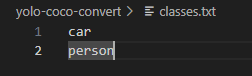
-> car는 yolo format에서 class id가 0, person은 1임
--output : 변환 된 json 파일 경로(확장자가 포함된 pull path)
https://github.com/YOOHYOJEONG/yolo-coco-converter
GitHub - YOOHYOJEONG/yolo-coco-converter
Contribute to YOOHYOJEONG/yolo-coco-converter development by creating an account on GitHub.
github.com