C++
C++ | std::max error 해결하기
토오오끼
2025. 11. 2. 22:01
728x90
반응형
#include <opencv2/opencv.hpp>
#include <onnxruntime_cxx_api.h>

#include <iostream>
#include <cmath>
#include <utility>
#include <vector>
#include <string>
#include <cstring>
#include <stdexcept>
#include <cstdio>
이 상태 일 땐 std::max 에러가 발생하지 않았었는데 아래처럼 windows.h를 추가하니까 std::max 코드 라인에 빨간 줄이 생기면서 에러가 발생했다.
#include <opencv2/opencv.hpp>
#include <onnxruntime_cxx_api.h>

#include <iostream>
#include <cmath>
#include <utility>
#include <vector>
#include <string>
#include <cstring>
#include <stdexcept>
#include <cstdio>

#ifdef _WIN32
  #include <windows.h>   // 추가한 부분
  #include <cwchar>   // std::wcscmp
#endif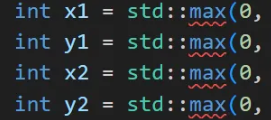
찾아보니 윈도우에서 windows.h가 min/max를 매크로로 정의해서 std::max와 충돌이 발생하기 때문이라 min/ax 매크로를 비활성화 해주면 에러가 해결된다.
#define NOMINMAX
#ifdef _WIN32
  #include <windows.h>
  #include <cwchar>   // std::wcscmp
#endif
MSVC 설정이라면 : Project Properties → c/c++ → Preprocessor → Preprocessor Definitions에 NOMINMAX를추가 해 주면 된다.
728x90
반응형